
A hired hall, a school gym, or your garage
You teach for the love of it. Keiko does the paperwork.
Members, families, waivers and who's paid, in one place instead of a notebook, a spreadsheet and a group chat. Free while your club is small.
Up to 15 active members free, every feature. Nothing reaches your members until you go live.
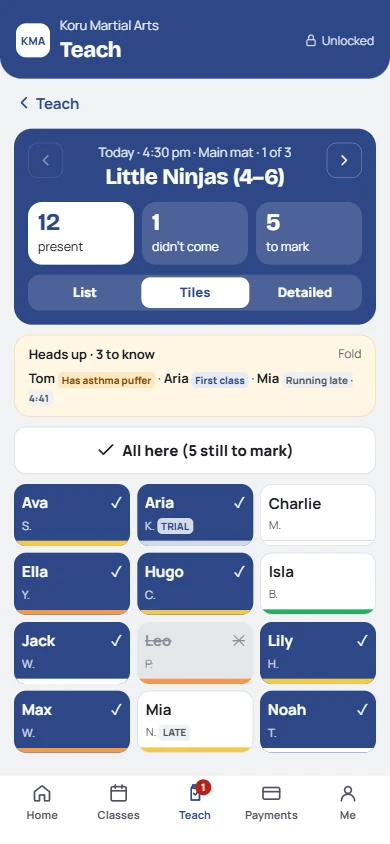
Before class: who's coming, and anything to know
For clubs like yours
- Someone else's building: a hall, a school gym, a community centre, or your own garage
- Part-time and usually unpaid, around a day job, often with a volunteer or two
- Kids and their parents, as well as adults, a class or two a week
- Bigger club with a committee? Give the treasurer and secretary their own sign-in.
Probably not for you if
- It's a handful of adults you know, always there, paying cash. A notebook works. Come back when it doesn't.
- You mainly teach one to one.
- You want us to hold the club's money. Fees go straight into the club's account. We never touch them.
Private lessons are KeikoForMe's job: keikoforme.com.
What changes for you
Less admin for the hours you already give for free.
They book, cancel, say they're away and see what they owe on their own page. One page for all their children.
Signed on a phone before the first class, kept with the member. A child turning 18 is asked to sign the adult one.
No cash tin, no spreadsheet. Members pay the club's account and tap I've paid; you confirm in one tap.
Cancel a date or move a class and the people booked are told by email. A notice for the class shows on the instructor's phone too.
A page for your club, its programs and instructors. Families book to watch or a free class without calling you.
Belts with dates, attendance and payments in one place, ready to hand to the next instructor or committee.
One scenario
A family with two children, sorted in one evening.
One parent, two kids, two classes, one bill. What used to take a dozen messages.
- KeikoJoining
Priya joins from your link and adds Ruby and Noah. One account, her own email and phone.
- KeikoWaivers
She signs a waiver for each child on her phone, with Ruby's asthma noted for the instructor.
- You · 1 tapBooking and paying
She books both into Juniors and pays the family membership by bank transfer. You tap Arrived.
- KeikoEvery week after
She sees both children's classes and belts on one page, and says when they're away.
What your members see
A parent's page with each child on it.
It arrives as a link by text, WhatsApp or email and saves to their home screen with your club's logo. Nothing to download.
- Book and cancel for each child
- Waivers, signed and kept
- One balance for the family, and how to pay the club
- Each child's belt and classes towards the next
Your volunteer instructor checks the class on their phone before members arrive: who's coming, injuries, who's not in photos, and any notice to read out. A PIN, no account, no money.
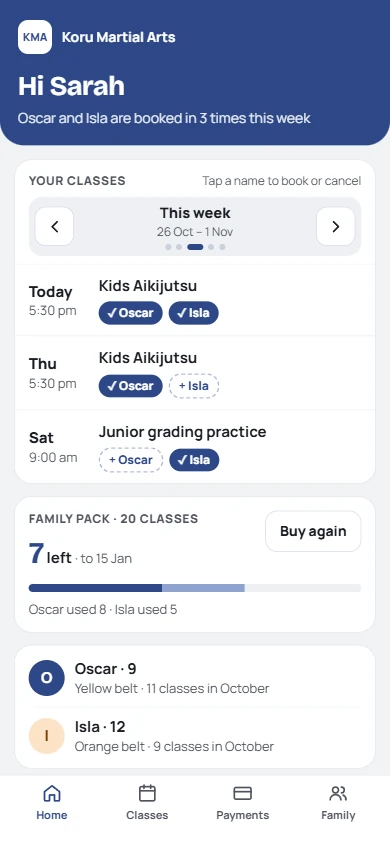
A parent of two
Your instructor, before class
What moving takes
An evening to set up. A week or two to go live.
Nothing reaches your members until you say so. Get something wrong in setup and nobody sees it.
Add your timetable and the hall. Look around the sample club to see how it works.
Bring your list across, or send your join link and let families fill in their own details.
Send pages to two families you know. Fix anything they notice.
Everyone gets their page. Check your first class on your phone.
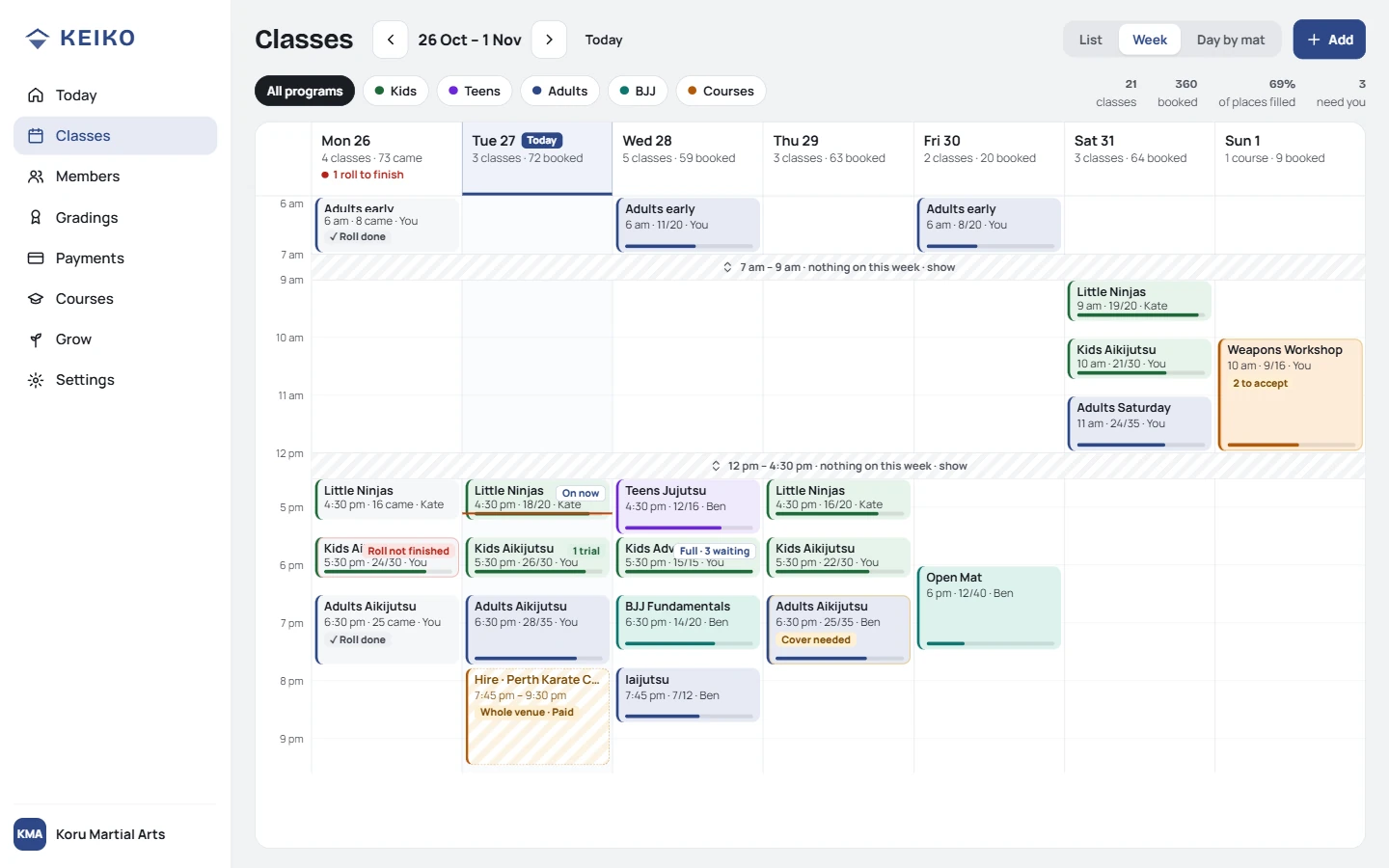
Set up once, at your desk: the week
What you bring across
Start from wherever your records are now.
Bring your spreadsheet across.
Download our template (it already has your plans, programs and belts, with drop-downs), paste your list in, check it, import. Families come in together, and you can undo the lot.
An evening to import and check.
Or start smaller
Run your next seminar or grading day on Keiko.
A visiting instructor, a self-defence afternoon, a grading. It gets its own page, registrations, waivers, reminder emails and a roll. People pay the club directly.
Next year, it's already done.
Add new dates and the same page is taking bookings again. Anyone who asked to hear about the next one is emailed for you.
Free: two runs a year, up to 20 places each.
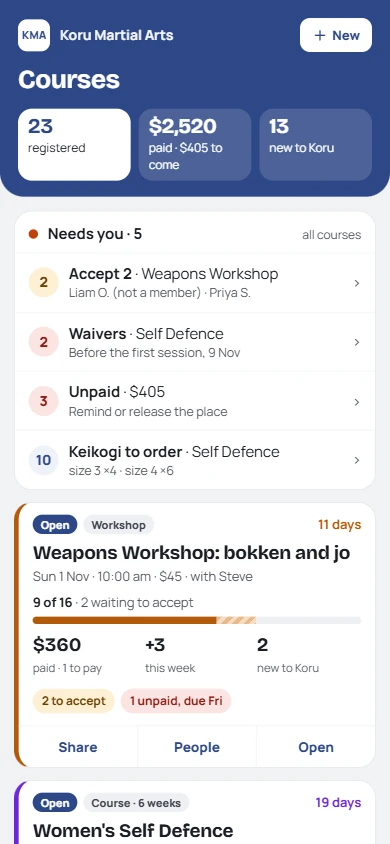
Your seminar: registered, signed, paid
What it costs
Most clubs like yours start on Free.
Every feature on every plan; you pay only when your club grows. Parents who only pay, and people trying a class or on a course, don't count. Prices include any GST or VAT we charge.
FreeClubs like yours
A$0
Up to 15 active members
2 workshops, courses or seminars in any 12 months (each run counts), up to 20 places each. No card.
Club
A$59a month
16 to 49 active members
From your 16th. About A$2 a member a month at 30 members.
Academy
A$89a month
50+ active members
Big clubs, often with a committee
At 16? You're told when you're close, then get 14 days. Everyone keeps training. 0% of your fees. Leaving? Export everything any time. Full pricing ›
How you'll know it's working
After a term, you'll notice:
Parents check their page instead of the group chat.
They can see what's due, and Keiko sends the one reminder for you.
From Google or your club page, booked to watch without a phone call.
Questions
What club instructors ask us.
- Is it complicated?
- If you can send a text, you can run it. Setup is your classes and your members, and Keiko walks you through both.
- What if I get it wrong in front of students?
- You can't during setup: nobody sees anything until you go live. After that, marking someone present is one tap and undoes with another.
- Do parents need an app?
- No. Their page is a link that saves to their home screen.
- How do they pay the club?
- Into the club's account by bank transfer, PayID or your own payment link. They tap I've paid; you confirm. We take 0%.
- Can I try it with one family first?
- Yes. Members come in as drafts: send one family their page and keep everyone else as they are.
- Our club has a committee. Can they help?
- Yes. Invite the treasurer or secretary with their own sign-in, and give instructors a Teach link.
Start when you're ready.
Free, no card. Set up at your own pace; go live when it suits the club.
Not quite you? I've got my own dojo, and a day job › · My dojo is my business ›